 Discount Bot
· 8 min read
How to Create Conditional Discounts in Shopify (Buy From Two Collections, Save on Both)
Build a Shopify discount that requires items from multiple collections: buy a bike rack and panniers, save 15% on both. Then add a second discount on overlapping products and keep both applying in the same cart.
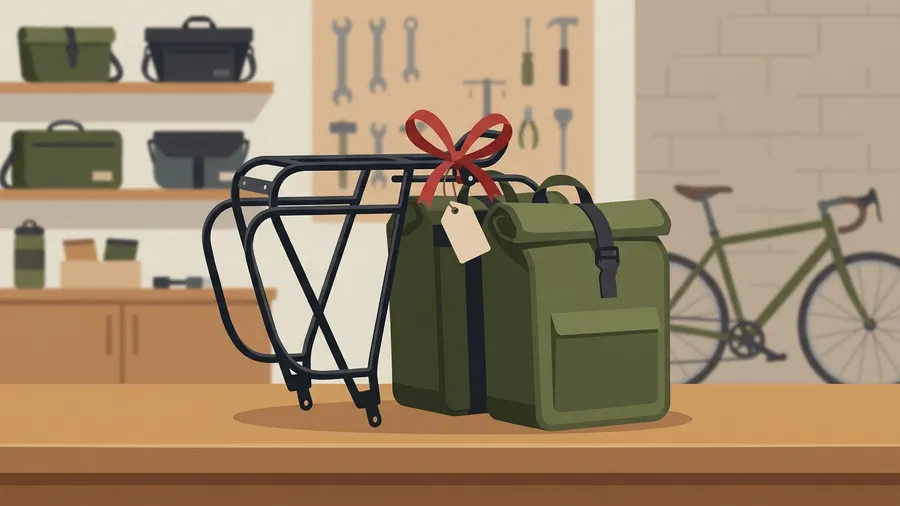
One of our merchants runs a bike shop, and they wrote to us about two promotions they wanted running at the same time: buy a bike rack and panniers and save 15% on both, and buy 3 or more bike bags and save 15% on all of them.
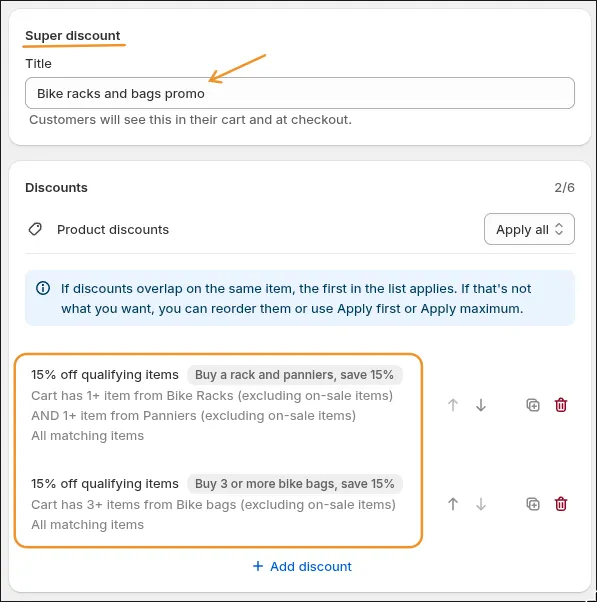
I’m going to show you how to build this in Discount Bot one step at a time. Before we start, here’s a quick look at the finished setup, so you know what we’re building toward:
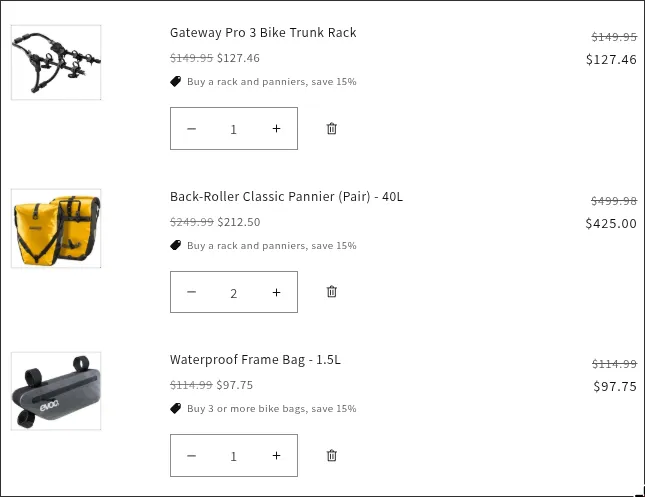
Here’s the cart it produces. A rack, two pairs of panniers and a frame bag, each with 15% off:
A discount that requires a purchase from multiple collections needs an app, because Shopify’s built-in discounts don’t look at what else is in the cart.
We’ll set up the first discount, adjust it twice, and then add the second one. The second one is where our merchant got stuck, and I’ll show you what they ran into and how we solved it together.
- Discount 1: Buy from two collections (a rack and panniers), save 15% on both
- Leave out items that are already on sale
- Discount every rack and pannier, paired or not
- Discount 2: Buy 3 or more bike bags, save 15% on all of them
Discount 1: Buy from two collections (a rack and panniers), save 15% on both
Our merchant wanted customers who buy a rack to pick up panniers in the same order, so the 15% should only apply when both are in the cart.
In Discount Bot, create a Super discount, give it a title, and click Add discount:
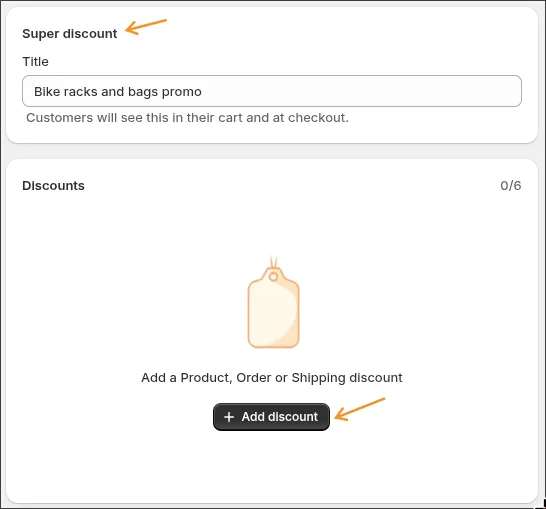
Choose a product discount and set it to 15%. In the field right under the discount class, type the name your customers will see next to the discounted items in their cart. Ours is “Buy a rack and panniers, save 15%”:
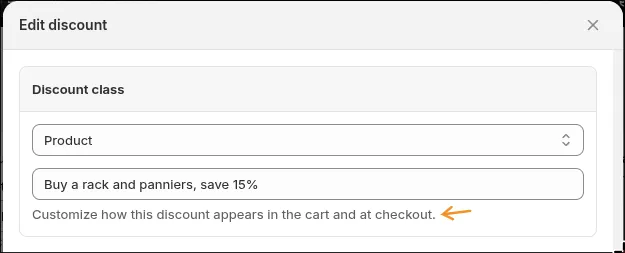
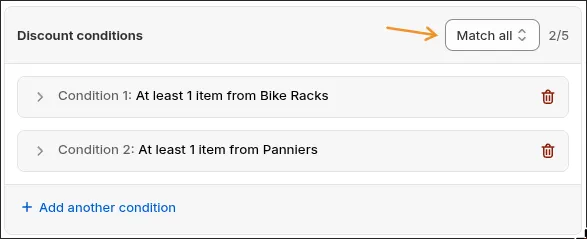
Then give the discount two conditions:
- Condition 1: at least 1 item from Bike Racks
- Condition 2: at least 1 item from Panniers
Leave the section on Match all, which tells the discount that the cart needs both.
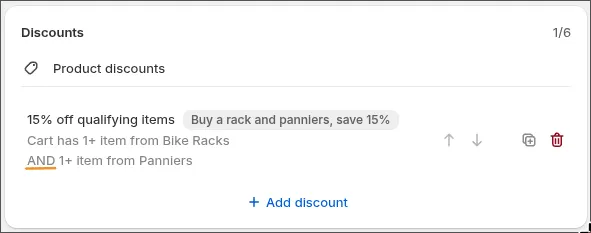
When you save it, the discount shows up in the list as “15% off qualifying items” with the name you typed beside it, and under it, “Cart has 1+ item from Bike Racks AND 1+ item from Panniers”. That AND is your Match all.
If a customer puts a rack and a pair of panniers in their cart, both get 15% off:
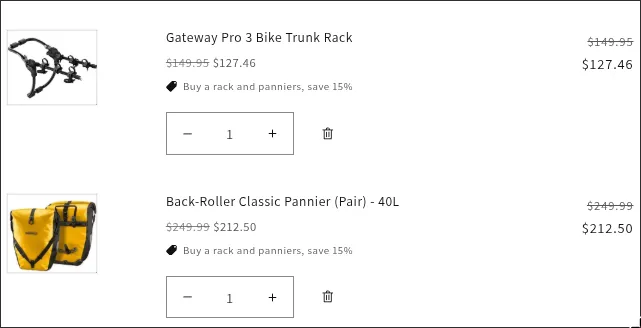
Now try to break it, the way our merchant did. Take the panniers out, and the rack goes back to full price. Panniers without a rack are charged full price too. The 15% only shows up when the cart has one of each.
Leave out items that are already on sale
Our merchant’s promotions were for regular-price products. If you’d also like to leave out items that are already marked down, open each condition and add an exclusion for on-sale items.
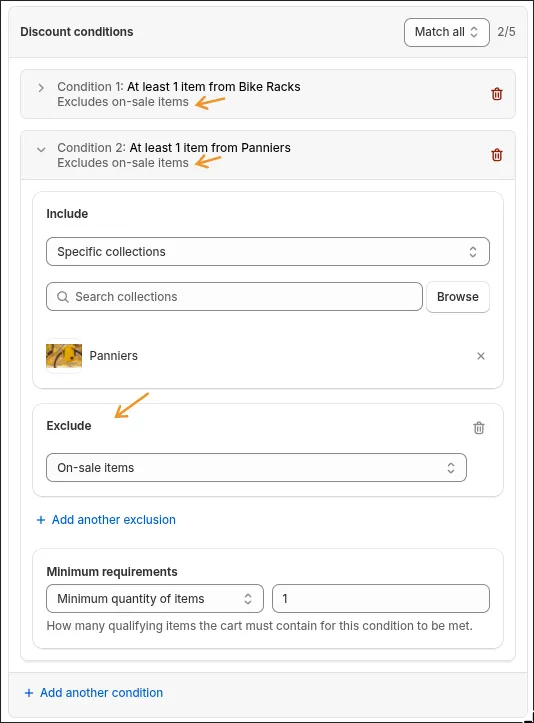
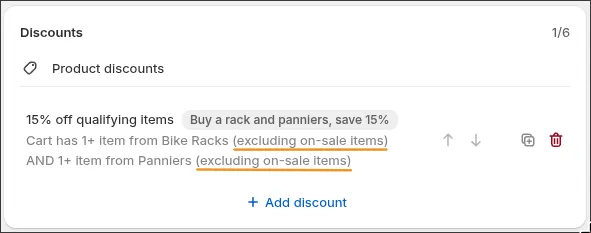
The discount in the list now says “Cart has 1+ item from Bike Racks (excluding on-sale items) AND 1+ item from Panniers (excluding on-sale items)”.
Here’s the cart to test this one with: the rack, plus a pair of Oceanwave panniers that are marked down from $250.00 to $199.95. Nothing is discounted. The Oceanwave panniers are on sale, so they no longer count as panniers for this discount, and a rack without panniers doesn’t qualify.
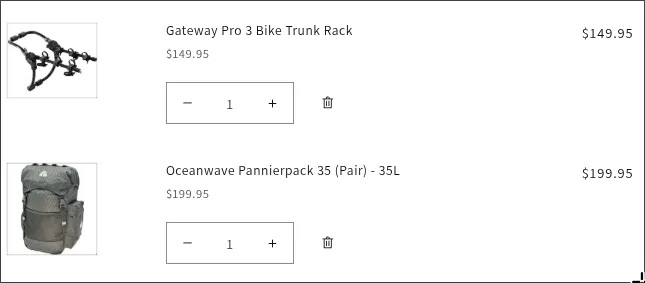
Discount Bot checks whether an item is on sale by looking at its compare-at price at the moment the cart is checked. This is especially useful if you find yourself taking products on and off sale, because you won’t have to come back and edit the discount every time you do.
Discount every rack and pannier, paired or not
Let’s test a cart that a customer could easily put together: one rack and two pairs of panniers.
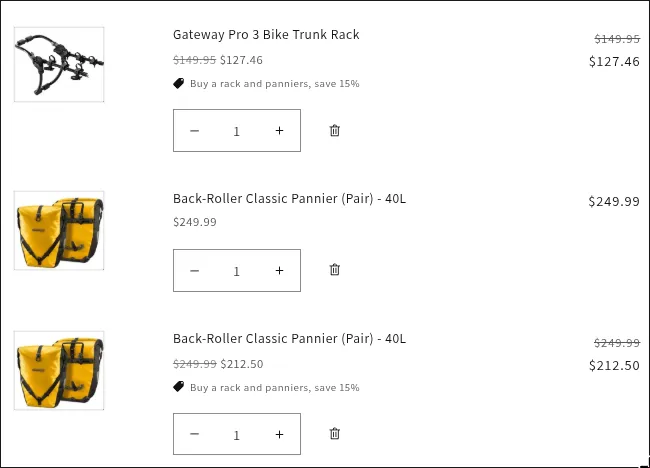
The rack and one pair of panniers get 15% off, and the second pair is charged full price. The discount applies once for every rack-and-panniers pair in the cart, and that second pair of panniers has no rack to go with.
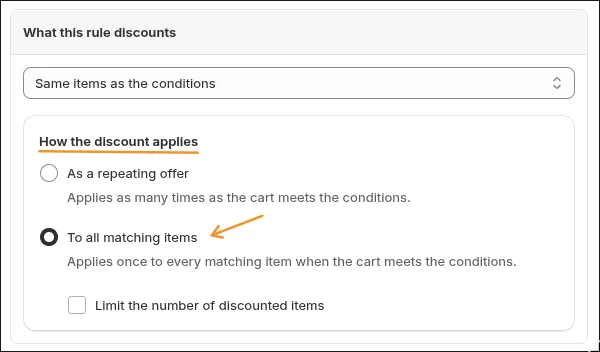
You may be happy with that. If you’d prefer that a customer who buys a rack gets 15% off every rack and pannier in the cart, open the discount and find How the discount applies, under What this rule discounts. You’ll see two options:
- As a repeating offer applies as many times as the cart meets the conditions. This is the pairing you just saw, and it’s what a new discount is set to.
- To all matching items applies once to every matching item when the cart meets the conditions.
Choose To all matching items and save.
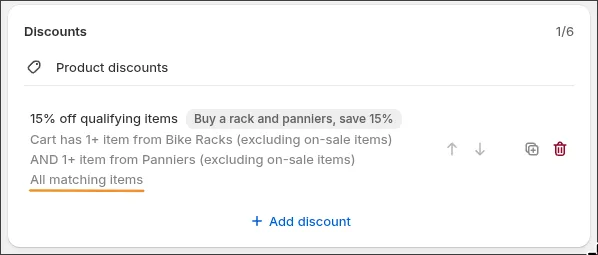
The discount in the list now has one more line, “All matching items”:
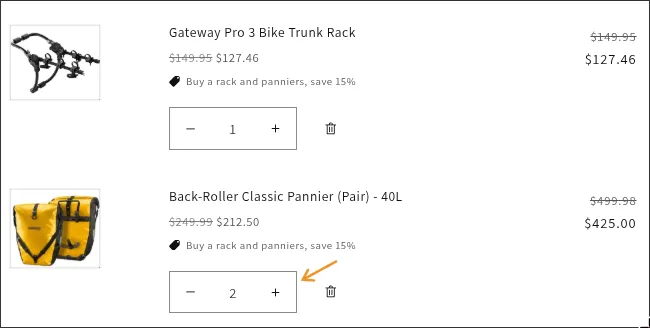
Put the same cart together again, and both pairs of panniers have their 15%:
Discount 2: Buy 3 or more bike bags, save 15% on all of them
This is where our merchant got stuck. Their panniers are in the Panniers collection and also in their Bike bags collection, so the two promotions share products. They had set them up as two separate discounts, and a cart that qualified for both only ever got one of them. Here’s the same situation on our store, with a rack, two pairs of panniers and a frame bag in the cart:
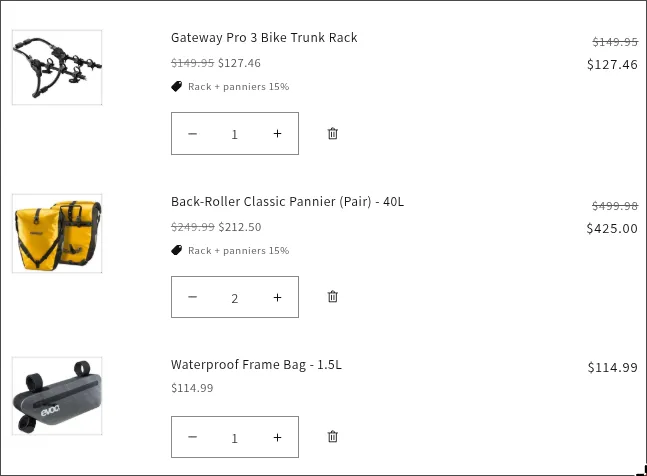
The rack and the panniers have their 15%. The frame bag is charged full price, even though it’s the third bike bag in the cart and “Buy 3 or more bike bags” should cover it.
Here’s why. That cart qualifies for both discounts, and when two discounts aren’t set to combine, Shopify applies the one that saves the customer more and drops the other entirely. In this cart the rack and panniers discount saves more, so it’s the one that stays, and the bike bags discount never shows up. With other prices it goes the other way: for our merchant, it was the rack that lost its 15%.
Discounts inside the same Super Discount don’t compete with each other. They always apply together. So we added their second promotion to the Super Discount they already had. Open yours, click Add discount, and set it up like the first one:
- A product discount of 15%, named “Buy 3 or more bike bags, save 15%”, with one condition: at least 3 items from Bike bags, excluding on-sale items
- How the discount applies set to To all matching items, so a customer’s fourth and fifth bags get the 15% as well
Then look at the selector at the top of the list and make sure it says Apply all. It applies every discount in the list that the cart qualifies for.
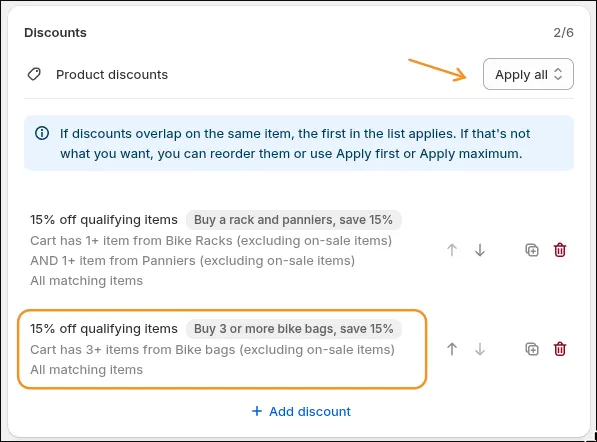
You’ll see a note there about the panniers’ situation: “If discounts overlap on the same item, the first in the list applies.” The panniers count toward both discounts, and a customer gets 15% off them once. Both of our discounts are 15%, so the order of the list only changes which discount’s name shows under the panniers in the cart. Ours show “Buy a rack and panniers, save 15%”, because that discount is first in the list.
Here’s that cart again, with both discounts in one Super Discount. The rack and the panniers keep their 15%, and the frame bag now gets its 15% from the bike bags discount:
Build it on your store
Everything above runs inside Shopify Functions, the same checkout technology Shopify’s own discounts use. Nothing loads in your storefront, and there are no cloned or hidden products behind it. You can run the whole thing as an automatic discount, like our merchant does, or put it behind a code.
Since you’ve read this far, you might also be interested in a few other promotions our merchants have found very useful:
- Buy a bike, save on the accessories, where the customer buys one set of products and the discount goes on a different one
- Spend $100, save $10, with more saved as the order total grows
- Free shipping by spend, collection, country, or rate
Install Discount Bot from the app store and build your perfect promotion. It’s rated 4.8 stars by merchants on the Shopify App Store.