 Discount Bot
· 7 min read
How to Generate Bulk Discount Codes in Shopify (Up to 1 Million)
Generate bulk discount codes in Shopify — random or custom, up to 1,000,000 at a time — and make each code single-use, limited to one unit.

Marketing wants every one of your 10,000 subscribers to get their own discount code. Unique, trackable, impossible to leak to a coupon site.
Now open the Shopify admin and count what one discount gives you: one code.
There’s no native button for the other 9,999. In this guide I’ll show you how to generate bulk discount codes in Shopify — random or from your own list, up to 1,000,000 at a time — and how to limit each code to a single use on a single unit.
- Why native Shopify stops at one code per discount
- Three ways to create bulk discount codes
- What happens after you click generate
- Managing and exporting your codes
- Every code carries your full discount rules
Why native Shopify stops at one code per discount
Create any code discount in the Shopify admin and look at the code field. There’s a Generate random code button — and it generates exactly one.
A discount holds a single code, so a 10,000-recipient campaign would mean creating 10,000 separate discounts by hand. Shopify does have machinery for attaching codes to a discount in bulk behind the scenes — it’s what discount apps are built on — but there’s no admin screen in front of it.
And two controls are missing even then:
- Usage limits govern the whole discount. The native levers — a total-use cap and “one use per customer” — apply to the discount overall. There’s no way to hand out a thousand codes and have each one retire after its first redemption.
- Nothing caps the units. A native discount has minimum requirements, but no maximums — “$20 off one pair, not 20% off the whole cart” isn’t a configuration you can express. A voucher meant as a fixed gift quietly covers however much is in the cart.
The setup most campaigns actually need — many codes, each single-use, each limited to one item — takes all three. Here’s how to build it.
Three ways to create bulk discount codes
Discount Bot adds a Bulk codes card to every code discount you create with it — including Super Discount, where one code can carry product, order and shipping savings at once. The card shows how many codes the discount already has, and its two links do everything in this guide:
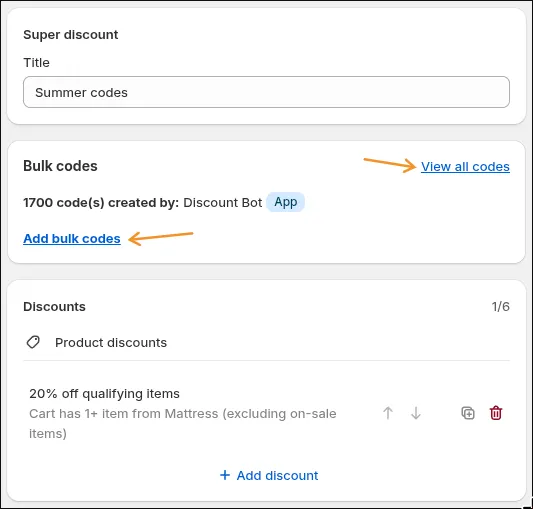
Save the discount, click Add bulk codes, and you get three options.
Scenario 1: Generate thousands of random codes
Pick Generate random codes and fill in four fields:
- Number of codes to generate — up to 1,000,000 at a time
- Code length — how many random characters each code gets
- Prefix / Suffix — optional fixed text around the random part, so
SUMMER-+ 8 characters produces codes likeSUMMER-2G6296TJ
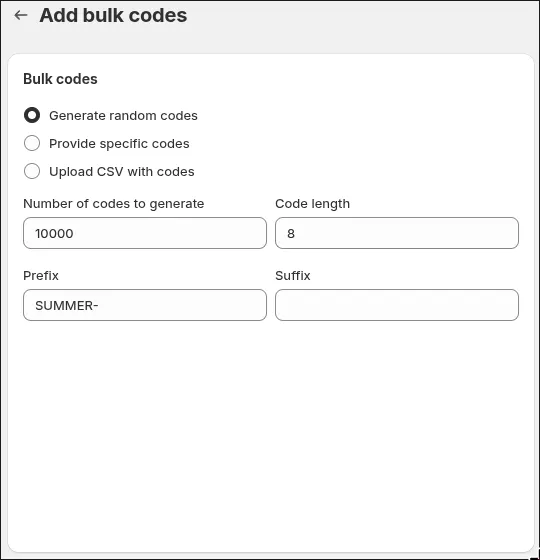
The prefix does double duty. It keeps the batch on-brand for shoppers, and it makes tracking simple later — every order whose code starts with SUMMER- came from this campaign.
Random codes are the right tool for the classic jobs: an email blast where every subscriber gets their own code, an insert card in every package, a winback offer that can’t be forwarded around.
Scenario 2: Import your own code list
Sometimes the codes already exist — your influencer partners were each promised their name as a code, or another platform generated the list and Shopify is the last stop.
Two import options sit next to the random generator:
- Provide specific codes — paste your list straight into the admin, one code per line
- Upload CSV with codes — for bigger lists, upload a CSV with a
Codecolumn
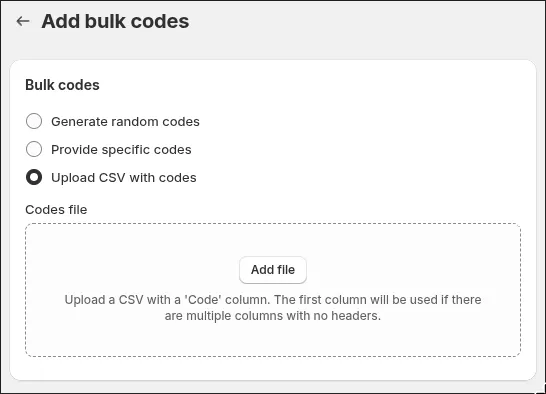
Every imported code behaves exactly like a generated one: same discount, same rules, same limits. Mix approaches freely — generate 50,000 random codes for the list, paste 20 named codes for the partners, one discount behind all of them.
Scenario 3: Single-use codes, one unit each
This is the question a large footwear retailer asked us the week we wrote this: “We need bulk codes, but each code should be valid for exactly one unit.”
Think warranty vouchers, employee perks, review rewards — anything where a code is a controlled gift, not an open invitation. Three settings, all on the same discount:
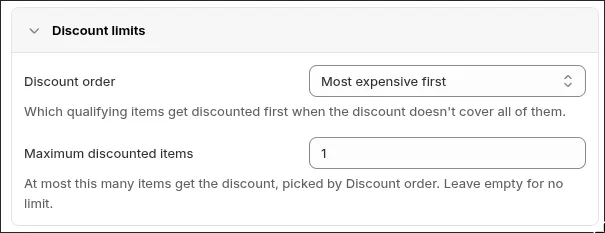
First, limit the discount to one unit. In the rule’s Discount limits section, set Maximum discounted items to 1. However full the cart is, the discount prices exactly one item — and Discount order decides whether that’s the most expensive or the cheapest qualifying item.
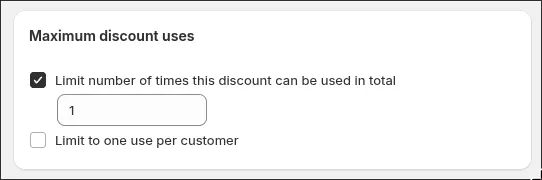
Second, limit each code to a single use. Under Maximum discount uses, tick Limit number of times this discount can be used in total and set it to 1.
Third, add your bulk codes — generate or import as many as the campaign needs, exactly as in the first two scenarios. Each code gets its own single use: the code list shows every code as 0/1 until it’s claimed.
The result: 5,000 codes, 5,000 possible redemptions, one discounted unit each — and a hard ceiling on what the campaign can cost you.
What happens after you click generate
A million codes don’t appear instantly — Shopify accepts bulk codes in batches, and Discount Bot feeds it in the background:
- You can close the tab. Generation keeps running on our servers and picks up where it left off.
- Progress is visible. The Bulk codes card shows the count climbing as the batch lands.
- Your storefront never notices. Codes live inside Shopify’s own discount system — there’s no script in your theme, no widget on your pages, and nothing slows your store down at checkout.
Managing and exporting your codes
Once a batch is in, View all codes takes you to the code list for your discount, and this is where the campaign comes together. You can search and filter codes, sort them, see how many uses each has left, delete the ones you no longer want, and — the big one — export the full list:
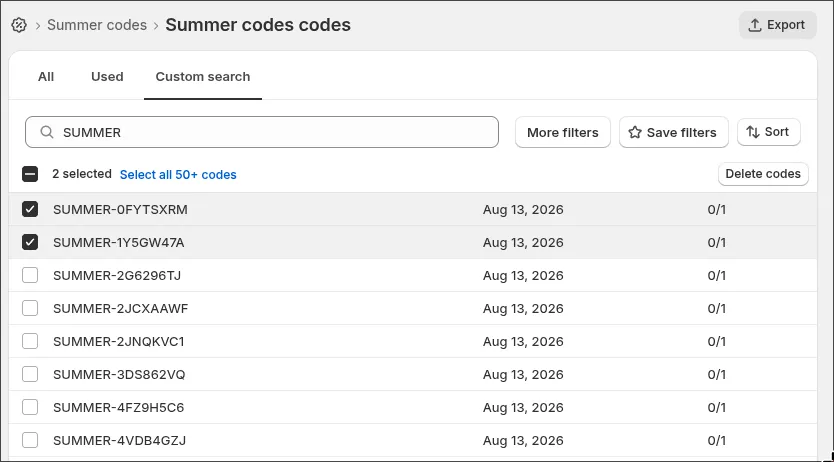
Export is how 10,000 generated codes become 10,000 personalized emails: download the list, hand it to your email platform, and mail-merge one code per recipient. The same export feeds insert-card printers, partner spreadsheets, or your own records.
Every code carries your full discount rules
Bulk codes aren’t a watered-down version of your discount. Each code is a key to the discount you configured — all of it:
- Exclusions — keep sale items, clearance collections, or tagged products out of every one of your 100,000 codes at once
- Cart conditions — require the right items in the cart first, with conditions like “buy from two collections” — a code simply won’t apply until the cart qualifies
- Stacked value — a Super Discount code can carry product, order and shipping savings together, and its bulk codes inherit the whole stack
Change the discount once and every code — generated, pasted or uploaded — follows.
Conclusion
One code per discount is where native Shopify stops; bulk discount codes in Shopify are a four-field form with the right app installed. Random or custom, ten codes or 1,000,000, single-use or evergreen — set it up the way your campaign needs.
Install Discount Bot from the app store and generate your first batch — there’s a 7 day trial.