 Discount Bot
· 5 min read
Spend $100, Save $10: Tiered Discounts by Order Total in Shopify
Set up a spend-more-save-more discount based on order total in Shopify — $5 off $50, $10 off $100, $20 off $200 — applied once per order, with the highest tier winning automatically.

Spend $50, get $5 off. Spend $100, get $10 off. Spend $200, get $20 off.
Promotions like this reward customers for adding more to their cart, and they’re one of the most dependable ways to raise average order value.
In this guide, I’ll set up a tiered discount based on order total in Shopify using Discount Bot: all three tiers on one code or automatic discount, applied once per order, with the highest qualifying tier applied automatically.
- Setting up a tiered discount based on order total
- Choosing what counts toward the minimums
- Discounting the products instead of the order
- Selling in more than one currency
Setting up a tiered discount based on order total
A Shopify discount holds one value and one minimum purchase amount, so a promotion with several spend tiers needs an app that can evaluate the tiers together. In Discount Bot, that’s a Super Discount with one order discount per tier.
Create a Super Discount and add three order discounts:
- $5 off order subtotal — Minimum requirements → minimum purchase amount $50
- $10 off order subtotal — minimum purchase amount $100
- $20 off order subtotal — minimum purchase amount $200
Then set the Order discounts section to Apply maximum:
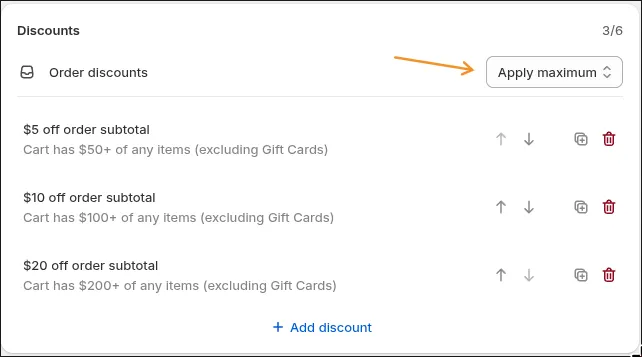
The tiers in this screenshot also exclude the Gift Cards collection from their minimums — that’s covered in the next section.
Apply maximum is what makes this one tiered discount rather than three competing ones. Every tier whose minimum the cart meets is considered, and only the largest amount is applied:
- $87 cart → $5 off
- $140 cart → $10 off, not $15
- $214 cart → $20 off, not $35
The amount is applied to the order subtotal once per order — it doesn’t multiply with quantity. And because the tiers live in one discount, they work as a single code, as an automatic discount, or across thousands of unique bulk codes, with the customer seeing one discount line at checkout.
Choosing what counts toward the minimums
Most stores don’t want every item counting toward a spend tier. Gift cards are the usual example — a $200 gift card isn’t $200 of merchandise — and already-marked-down clearance is another.
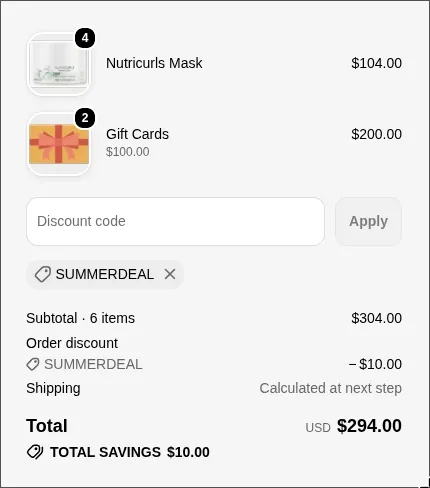
Each tier’s minimum takes exclusions: collections, specific products, or on-sale items that don’t count toward the total. With the Gift Cards collection excluded, this cart totals $304, but only $104 of it counts — so it receives the $10 tier rather than the $20 one:
Two details worth knowing:
- Minimums are measured against cart prices before any discounts are applied, so a cart’s tier doesn’t change while savings are being calculated.
- The same exclusions work for on-sale items, checked in real time against compare-at prices — the same approach as excluding sale items from discounts.
Discounting the products instead of the order
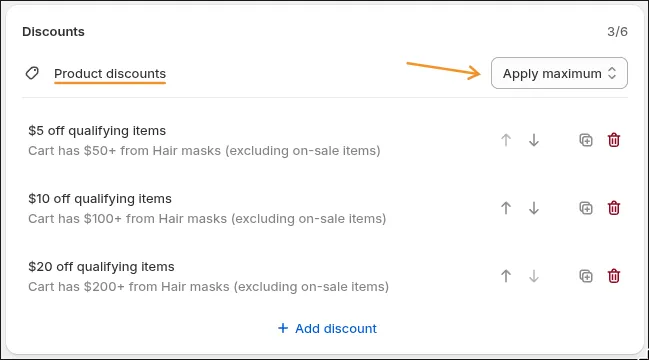
So far, every tier has taken its amount off the order subtotal. The same tiers can instead discount the qualifying products themselves — that’s the difference between an order discount and a product discount in a Super Discount.
Switch the discount from Order to Product, and each tier’s amount applies to each qualifying item rather than once to the order. This example keeps the $50 / $100 / $200 tiers, with the minimums measured on the Hair Masks collection — scoping a minimum to a collection uses the same conditions covered in the conditional discounts guide:
Here’s a cart with four masks — $104 of mask spend, which meets the $10 tier — plus a gift card and twenty packs of floss:
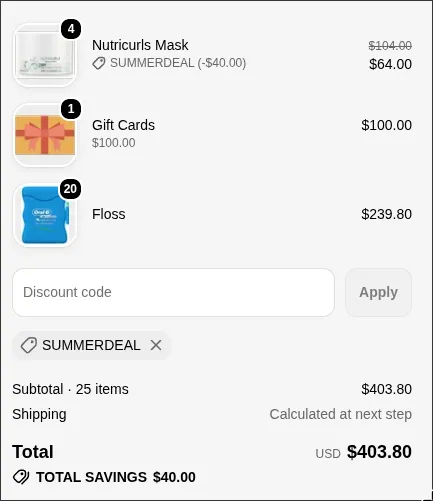
Each mask is discounted $10, for $40 in total, and the gift card and floss stay at full price. Use product-level tiers when the promotion belongs to one collection, and order-level tiers when it belongs to the whole cart.
Selling in more than one currency
Tiers are defined in your store’s currency. When a customer checks out in a different currency, Discount Bot converts the minimums and discount amounts at your store’s current exchange rates — the tiers keep working in every market you sell to, with no separate setup per currency.
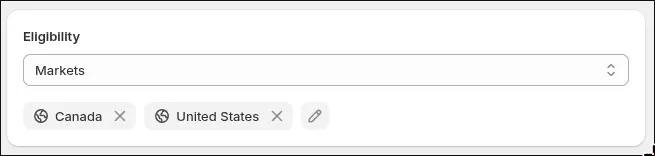
If a tier promotion should run in only some of those markets, restrict the whole discount rather than building one per region. In the Super Discount’s Eligibility card, choose Markets and pick them — the same choice native discounts offer, alongside customer segments and specific customers. Every tier then applies only to customers shopping in those markets, whether the discount is automatic or a code:
One discount, three tiers
A tiered discount based on order total comes down to three settings in Discount Bot: one order discount per tier, Apply maximum, and exclusions for anything that shouldn’t count toward the minimums.
Install Discount Bot from the app store and set up your first tiers — there’s a 7 day trial.