 Discount Bot
· 9 min read
How to Exclude Products from Shopify Discounts: A Step-by-Step Guide
Discover how to exclude sale items, products, and collections from Shopify discounts so your promotions stay targeted, flexible, and easy to maintain.

In this post I’ll show you exactly how you can exclude certain products (or collections) from Shopify discounts.
The best part?
The peace of mind you get knowing you are not going to accidentally discount products that should never be on sale.
Let’s dive in…
- Limitations of Shopify’s Native Discounts
- How to exclude products with Discount Bot
- The one idea behind it all: scope, then subtract
- Why being able to specify exclusions is good
- Bonus #1: The different exclusions work together
- Bonus #2: Discount Bot does not affect your store’s performance
- Bonus #3: Sale-item exclusions work for Buy X Get Y gifts too
Limitations of Shopify’s Native Discounts
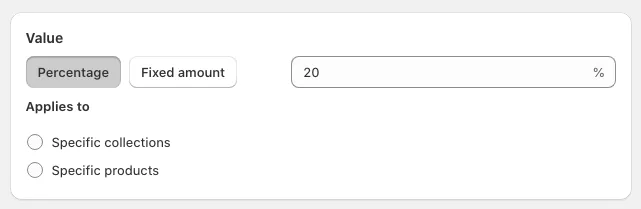
Shopify has 3 discount types - Product, Order and Shipping.
For this post, we’ll specifically look at Product discounts. (Want to discount the whole cart instead? See our guide on creating and using sitewide order discounts.) Shopify lets you specify:
- Amount off value: Percentage or Fixed amount
- Applies to: Specific collections or products for which the discount should be APPLIED to
Starting out, there’s nothing wrong in setting up discounts this way.
However…
Once your store starts growing and you have lots of products, collections and on-sale items, you’ll start running into the following issues:
- As you put products on sale, you’ll have to remove them from the discounts (Unless you’re ok with customers getting a discount on sale items).
- When products go off sale, you’ll have to do the opposite - adding them to the discounts.
- When you add new products to your catalog, you guessed it - time to update all those discounts to include them.
- You can only have 100 products, and variants in each discount. Now, that’s a bummer!
- And here’s the one that bites most: native Shopify discounts are all-or-nothing per collection. Target a collection but want to leave out even one product inside it? Shopify gives you no way to do that — your only option is to abandon the collection and hand-pick the individual products instead, which drops you right back into the 100-item limit and the constant upkeep above.
How to exclude products with Discount Bot
The native Shopify discounts let you define a box around the products or collections that should be discounted.
Discount Bot lets you go one step further…
Once you have a general idea of what you’re discounting, you can refine the list by exclude items from that starting list.
Let’s look at a few scenarios…
Scenario 1: Exclude products already on sale
Let’s say you create a 20% off coupon with a starting list of 2 collections:
- Black Friday (40 products / variants), 5 of which are already on sale
- Summer Fun (50 products / variants), 10 of which are already on sale
This makes a total of 90 products / variants in those 2 collections that you want to apply the discounts to.
But wait..
There are 15 products / variants between those 2 collections that are already on sale. What if you don’t want to apply the 20% off on those items?
With Discount Bot, you can just select this one checkbox. The coupon code will continue to apply for all products / variants in those 2 collections, but will NOT apply to the 15 items that are already on sale.
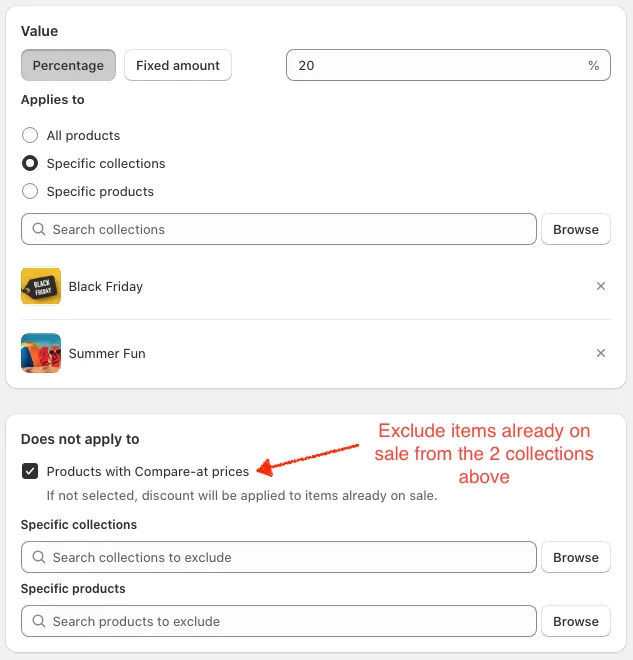
If you’re only using the native Shopify discounts, you’d have to resort to setting up your discounts a different way - picking and choosing only the products / variants from those 2 collections that are NOT on sale so the 20% coupon doesn’t apply to them.
And here’s the best part…
After you’ve saved the discount, let’s say you mark 5 more items on sale within the Black Friday collection. You DO NOT have to come back to the discount to edit it. That’s because the discount checks in real time when items within the collections are on-sale or not at the time someone adds them to their cart and applies the coupon code. It doesn’t matter whether they were on sale or not when the coupon was created!
Scenario 2: Exclude specific collections
You want to create a 10% off coupon for the Summer Fun collection.
But let’s say 5 of those products are really special and you don’t want to discount them. Also assume all the one-of-a-kind items in your store are in a One of a kind collection.
So you have the following collections:
- Summer Fun (50 products / variants), 5 of these are also in the One of a kind collection
- One of a kind (85 products / variants)
To setup a 10% discount that only applies to 45 products in the Summer Fun collection (because 5 of them are One of kind), you can just set up the discount like this:
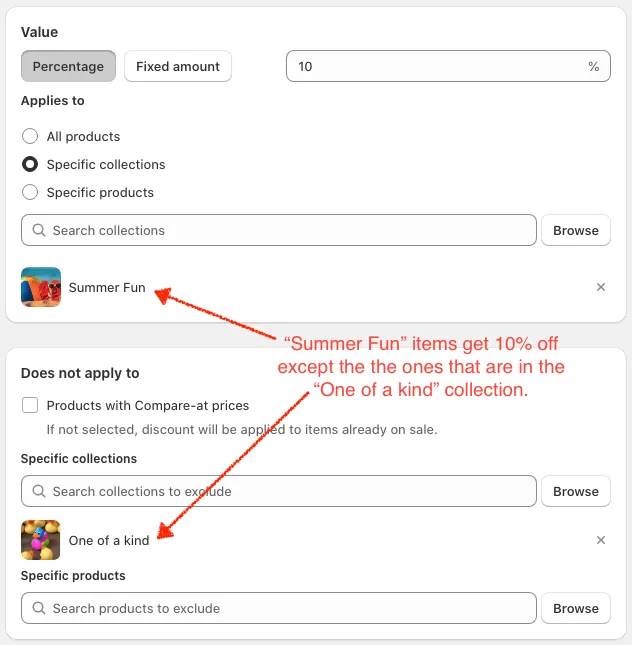
Notice you’re subtracting a whole collection from another, in one step. On native Shopify there’s no “minus” — you’d be back to picking the 45 products by hand.
Scenario 3: Exclude specific products
You want to create a 25% off coupon for the Summer Fun collection.
But you don’t want the coupon to apply a couple products / variants even though they’re not on sale.
So you have:
- Summer Fun (50 products / variants), 2 of these you don’t want to discount
- The two products are not on sale
To setup a 25% discount that only applies to 48 products in the Summer Fun collection (because you don’t want to discount 2 of them), you can just set up the discount like this:
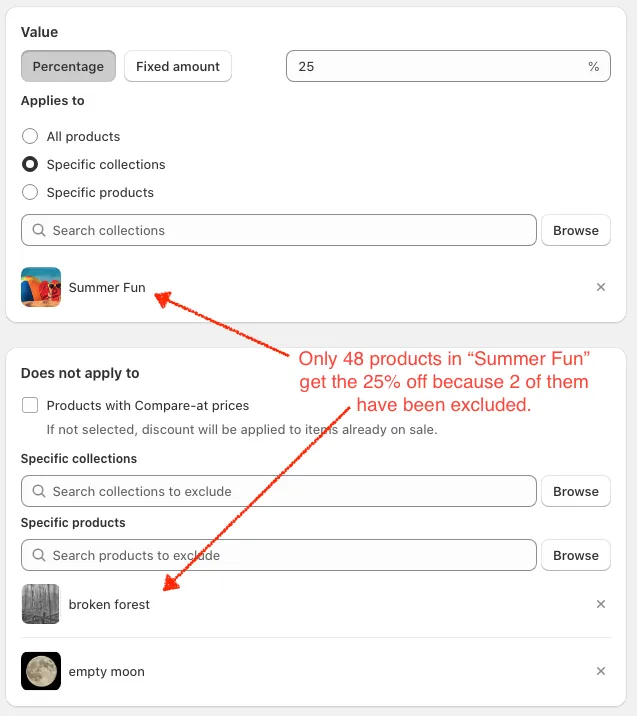
Native Shopify can’t do this. Once you point a discount at a collection, it’s the whole collection or nothing — to leave out those 2 products you’d have to throw the collection away and list the other 48 by hand. With Discount Bot the collection stays as your starting box and the 2 products just come off the top.
Scenario 4: Exclude products by tag
Already using product tags to organize your catalog? Think Final Sale, Premium, Clearance…
You can point your exclusions straight at them.
Say you’re running 15% off, but anything tagged both Premium and Winter should never be discounted. In the discount’s Does not apply to section, add a product tag condition:
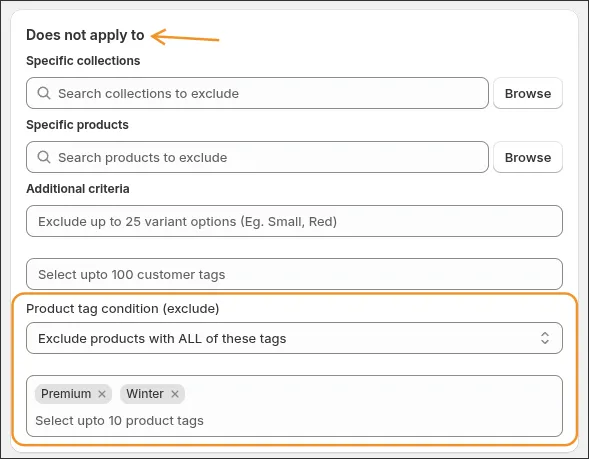
You choose whether a product needs ALL of the tags or ANY of them to be excluded.
And it works in the other direction too. The Applies to section takes an include rule, so you can build a discount that only applies to tagged products:
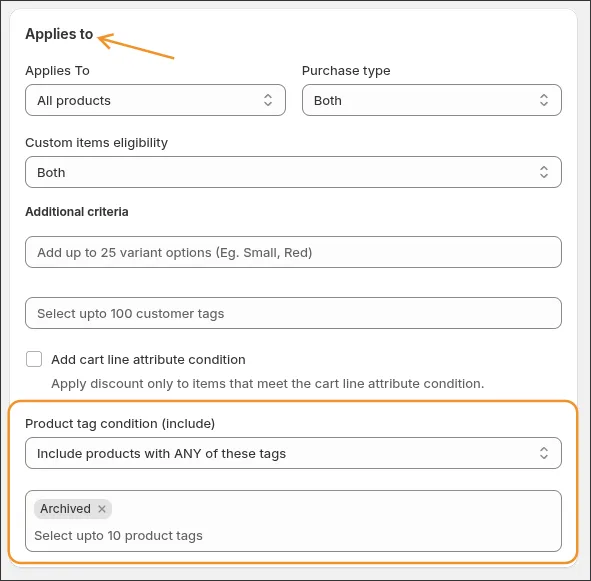
Like every other exclusion in this post, tags are checked in real time when the shopper’s cart is evaluated — retag a product and your discounts pick it up instantly, no editing required.
The one idea behind it all: scope, then subtract
If you take one thing away from this post, make it this — it’s how I’d set up almost any discount in Discount Bot:
- Start with the widest scope that makes sense — your whole catalog, or a collection or two. Don’t hand-pick exact products up front.
- Then chip away with exclusions — on-sale items, a few specific products, an overlapping collection, a product tag. Whatever shouldn’t be in the promo comes off the top.
Every scenario above is just a different thing subtracted from that same starting box. The payoff is that your discount now describes a rule (“Summer Fun, minus the on-sale stuff”) instead of a frozen list of products — and that’s exactly why it stays so low-maintenance.
And exclusions are only half of the rule story. The other half is making a discount switch on only when the right items are in the cart — like requiring purchases from two different collections before anything gets discounted. That’s covered in how to create conditional discounts in Shopify.
Why being able to specify exclusions is good
Now let’s revisit what you get when able to also specify exclusions this way…
- As you move products in and out of sales, the discounts themselves don’t have to be modified
- As you add more products to your store, existing discounts automatically apply to them without needing to be updated
- You don’t run up against the 100 products / variants limit for a discount code. This is because you’re only specifying the products / collections you don’t want the discounts to apply to
Bonus #1: The different exclusions work together
Now you must be wondering if you can combine multiple exclusions. Of course you can, but why would you?
Let’s take the scenario 3 above where you created a 25% off coupon for the Summer Fun collection.
But this time, not only do you want to leave out a couple of products in the collection, but you also want to exclude any products already on sale.
In that case, you would use both the on-sale exclusion and the products exclusion like so:
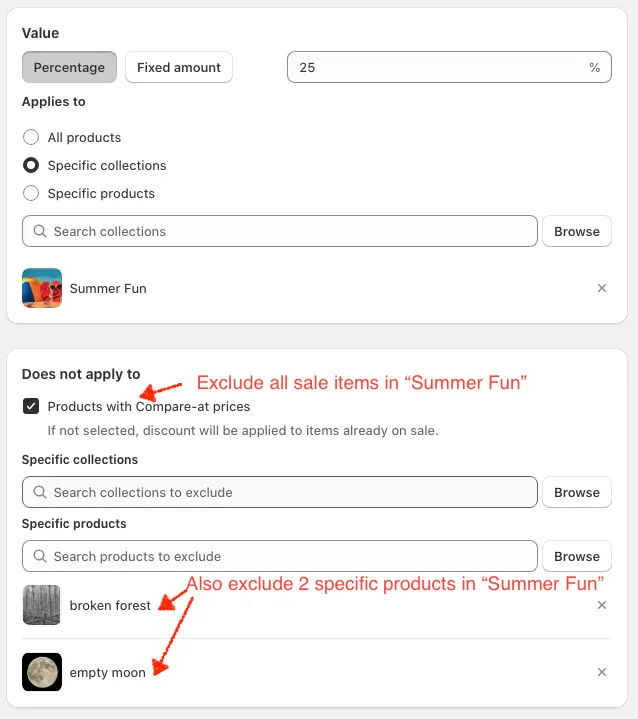
If you really want to get creative, you can exclude on-sale items, some collections and some products for a really refined discount.
Bonus #2: Discount Bot does not affect your store’s performance
Did I mention that Discount Bot is built using Shopify Functions for native performance and feel?
What that really boils down to is that Discount Bot:
- Is super fast on the admin side
- Has alsmost no impact on storefront performance because it doesn’t run on the browser
- Doesn’t interfere with any native Shopify discounts - they can exist side by side
Bonus #3: Sale-item exclusions work for Buy X Get Y gifts too
The on-sale exclusion from Scenario 1 isn’t limited to percentage-off discounts.
If you run Buy X Get Y offers, each Get Y tier has its own Sale items eligibility setting — so you decide whether an already-marked-down product can be handed out as the free (or discounted) gift:
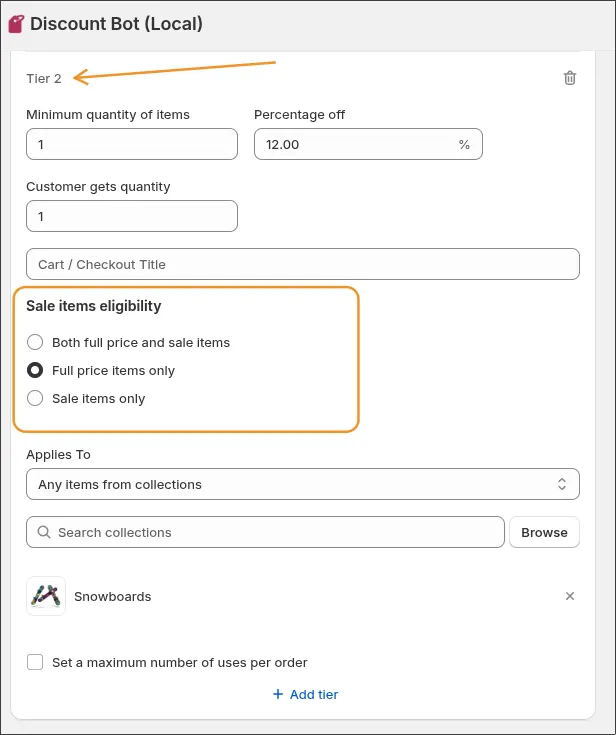
Full price items only, sale items only, or both. Per tier.
And if you want those Buy X Get Y offers to actually get claimed, we just shipped a cart widget that shows them right in the cart with a one-click Apply — see How to offer a free gift with a discount code in Shopify.
Conclusion
I hope the post explains how to use product exclusions to create just the discount that you want.
Which exclusion type is most useful for you?
Install Discount Bot from the app store and find out - we also provide a 7 day trial.