 Discount Bot
· 6 min read
How to Create Buy X Get Y Discounts in Shopify (Same or Different Products)
Create Buy X Get Y discounts in Shopify where the reward can be a different product: qualify by quantity, spend, or total cart value, exclude items, and add tiers.

Buy a bike, get the pannier free.
Spend $2,000 on a mattress, get 15% off everything else in the cart.
Both are Buy X Get Y discounts in Shopify: the shopper qualifies with one set of items, and the reward applies to a different set. In this guide I’ll build both, spending most of the time on the reward side, because that’s where Buy X Get Y differs from other Super Discount rules.
A quick word on the native option before we start. Shopify’s native Buy X Get Y holds one buy list and one get list: the minimum it checks, whether a quantity or a spend, counts only the items on the buy list, and the reward is a fixed list of products or collections with a single reward value. Everything in this guide that goes past that runs on Discount Bot’s Super Discount.
On a Super Discount rule, conditions normally do two jobs: they decide when the discount applies, and they mark which items receive it. That combination is Qualifying items, the default. Buy X Get Y separates the two jobs: conditions still decide when, and a separate reward selection decides what.
The buy side you already know
There is nothing new to learn on the buy side. It’s the rule’s conditions, and everything the conditions guide covers applies unchanged: quantity minimums, spend minimums, several conditions under Match all or Match any, and exclusions per condition, including full-price-only qualifying.
That includes the cart-total trigger: a spend condition on any items means the order total has passed the amount, whatever is in the cart. Native Buy X Get Y has no equivalent; its minimum only counts items on its own buy list.
The mattress deal from the top of this guide qualifies with a single spend condition: $2,000+ from the Mattress collection. Swap its items to any items and the same deal would trigger on the order total instead. Either way, the buy side is standard conditions; the reward side is where the new decisions are.
The reward side of a Buy X Get Y
The choice is at the top of the rule, under What this rule discounts. The default is Qualifying items; switch it to Different items (Buy X Get Y) and a reward section appears below it:
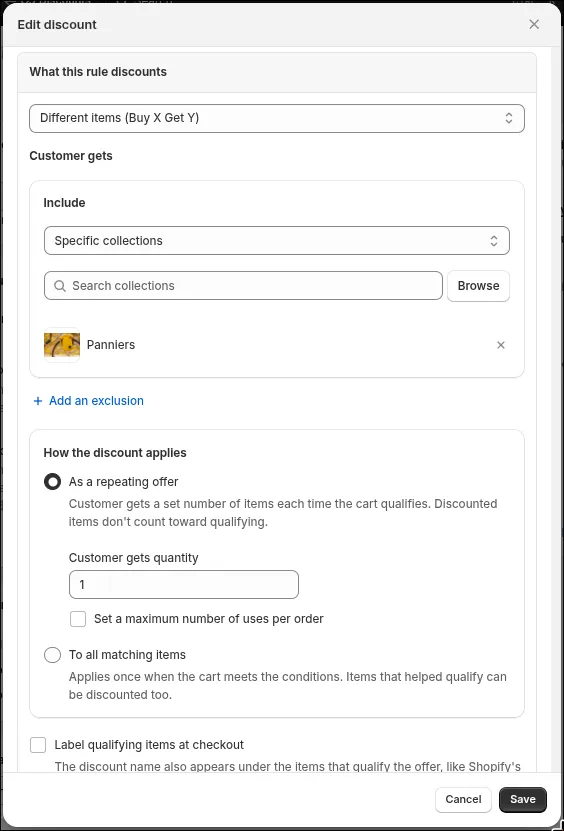
This one section holds every reward decision: which items the reward covers, and how it applies.
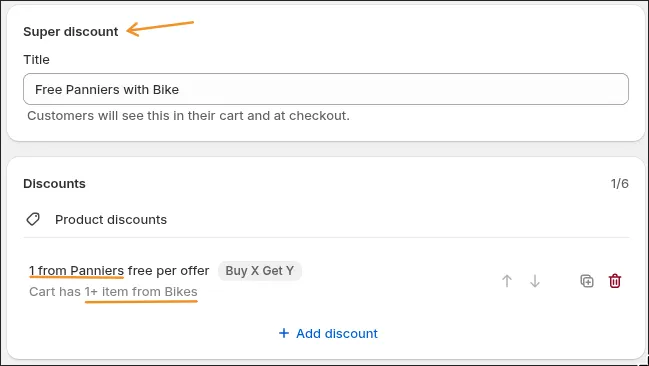
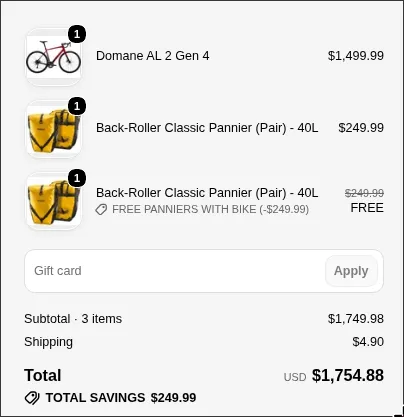
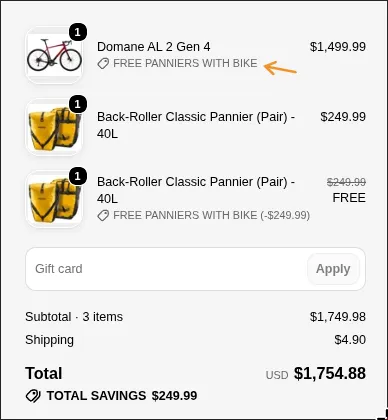
For the bike deal: the condition asks for at least one item from Bikes, and the reward is the Panniers collection, As a repeating offer, quantity 1, at 100% off. The discount’s summary shows both halves:
At checkout the bike stays at full price and one pannier is free:
Pick the reward like you scope a condition
The reward selection uses the same include-then-exclude controls a condition uses: include collections or products, then exclude collections, products, or sale items.
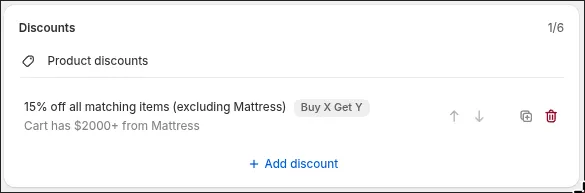
Exclusions are what make “everything else” possible. Take the mattress deal: its reward is all items with the Mattress collection excluded, at 15% off. There is no mirror collection to build, and no product list to maintain as the catalog changes:
The sale-items exclusion deserves a specific mention: exclude on-sale items from the reward, and a product already marked down cannot double as the gift. Like every sale-item rule in Discount Bot, it reads the compare-at price at the moment the cart is evaluated, so changing your sale prices never requires editing the discount.
Repeating offers vs. all matching items
The reward’s second setting is How the discount applies. Both options are visible in the screenshot above.
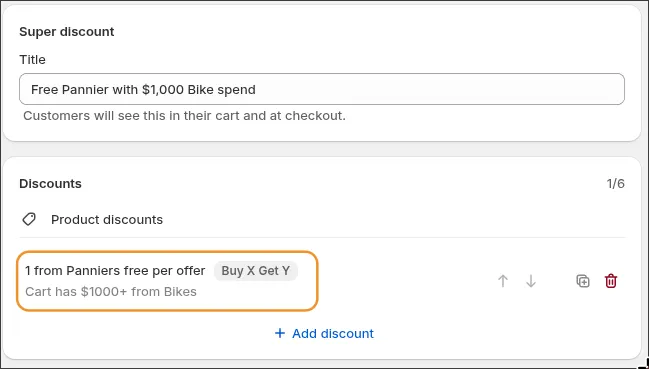
As a repeating offer is the classic behavior: the shopper receives a set number of reward items each time the cart qualifies. It works with spend conditions too. Set the bike deal’s minimum to $1,000 spent on Bikes, and the shopper gets another free pannier for every $1,000 of bikes in the cart:
Two bikes cover the threshold twice, so two panniers are free:
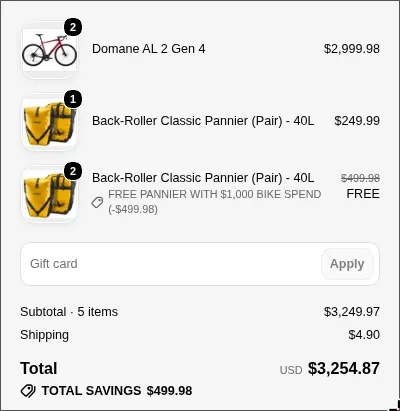
One detail to know: reward items never count toward the spend that unlocks them, so a free pannier cannot contribute to its own threshold. Native Buy X Get Y counts spend the same way, and shoppers see the behavior they already expect.
A repeating offer has two limits of its own: a checkbox that decides whether a shopper short of a full offer still receives the reward, and Set a maximum number of uses per order, which caps how many times the offer repeats in one cart.
To all matching items applies the reward once, to every item the reward selection matches. That’s the right setting for the mattress deal: whether the cart holds two non-mattress items or ten, each one gets 15% off, and the offer does not multiply:
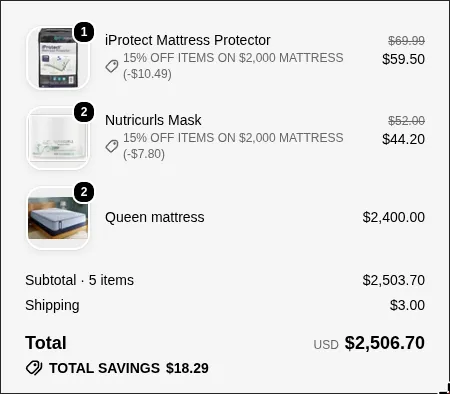
Its limits are different, because there are no offers to count: Limit the number of discounted items caps how many matches receive the reward, and Discount order decides whether the cheapest or the most expensive matches are chosen.
Tiers and stacking work the same as for any Super Discount: tiers are rules at ascending cart totals under Apply maximum, and order or shipping rules go on the same code. The conditions guide covers both.
What shoppers see
Two notes on how the deal appears in the cart.
Show shoppers which items qualified
A Buy X Get Y across different products can leave shoppers wondering why certain items got cheaper. The Label qualifying items at checkout setting addresses that:

Turn it on and the discount name appears under the items that unlocked the deal, the same way native Buy X Get Y marks them. In this checkout it appears under the bike, next to the free pannier:
Claiming the gift in one click
One route this guide doesn’t cover: shoppers claiming the gift themselves from the cart. The cart widget’s one-click claim works with the classic standalone Buy X Get Y type, not with Super Discounts. If self-serve gift claiming is the point of your promotion, the free-gift guide covers that setup end to end.
Conclusion
A live, whole-cart Buy X Get Y comes down to a handful of decisions in one discount: who qualifies, what the reward covers, and how it applies. None of it needs revisiting when your prices move.
Install Discount Bot from the app store to build yours — there’s a 7 day trial.