 Discount Bot
· 7 min read
How to Offer a Free Gift With a Discount Code in Shopify (That Shoppers Can Claim in One Click)
Set up a free gift with a discount code in Shopify — and show the offer right in the cart so shoppers can add their gift with one click.

In this post I’ll show you how to offer a free gift with a discount code in Shopify — and how to make sure your shoppers actually see the offer and claim it.
Because here’s the uncomfortable truth about Buy X Get Y codes:
Most shoppers never find out they exist.
With the new Discount Bot cart widget, your offer shows up right in the cart, and eligible shoppers claim their gift with one click — the gift is added to the cart and the code is applied for them.
Let’s work through the process…
- Limitations of Shopify’s Native BXGY Discounts
- How to offer a free gift with a discount code using Discount Bot
- What about automatic Buy X Get Y discounts?
- Bonus #1: You decide whether sale items can be the gift
- Bonus #2: No cloned products, no performance hit
Limitations of Shopify’s Native BXGY Discounts
Shopify’s native discounts do support Buy X Get Y — both as a discount code and as an automatic discount.
So what’s the problem?
The discount only kicks in when both the X and the Y items are already in the cart. Native Shopify never adds the gift for your shopper, and it never tells them the offer exists in the first place.
That means for a shopper to get their free gift, they have to:
- Somehow know your Buy X Get Y code exists
- Find the gift product in your catalog and add it to their cart themselves
- Enter the code
Three chances to lose the sale. And in practice, the shopper who didn’t get the gift they qualified for isn’t just a smaller order — they’re a support email (“I bought 2, where’s my free one?”) or an abandoned cart.
How to offer a free gift with a discount code using Discount Bot
Discount Bot fixes this in two parts:
- A Buy X Get Y discount code with more flexible rules than native (tiers, sale-item eligibility, exclusions)
- A cart widget that shows your code offers right in the cart — with a one-click Apply that adds the gift and applies the code in one go
Let’s set it up…
Step 1: Create the Buy X Get Y code
In Discount Bot, create a Buy X Get Y discount and give it a code (say, GIFT4YOU).
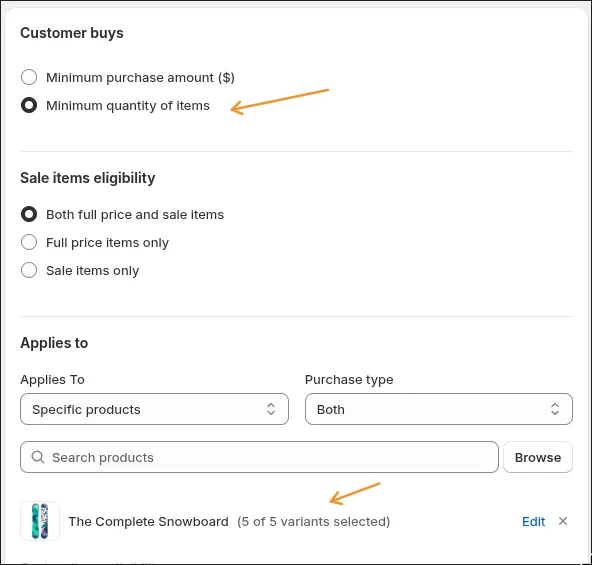
Start with the Customer buys section, the Buy X side — what unlocks the gift: a minimum spend or a minimum quantity of qualifying items:
Then Customer gets, the Get Y side: what the shopper gets, how many, and the discount on it. Set Percentage off to 100 and the gift is completely free. Here, a gift card:
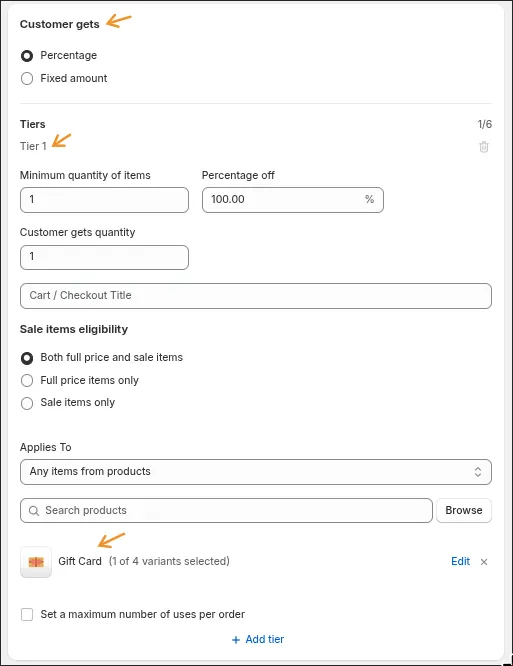
Want bigger baskets to earn bigger gifts? Click Add tier and stack rewards: buy 2, the gift at 50% off; buy 4, the gift free. The shopper always receives the best tier they qualify for — one discount, one code, no competing promotions.
(Building a richer Buy X Get Y — the reward pointed at a different selection, whole-cart spend triggers, tiers on the order total? That’s Super Discount Buy X Get Y. One note: the widget’s one-click claim works with the classic type this guide uses, not with Super Discounts.)
Step 2: Turn on the cart widget
The widget ships as a theme app embed — you flip it on once in your theme editor, no code and no theme surgery.
The Discount Bot dashboard walks you through it and shows you whether the embed is currently enabled:
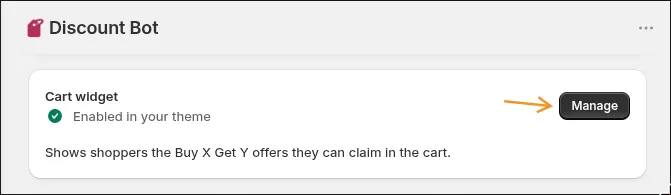
Clicking through takes you straight to the right spot in the theme editor:
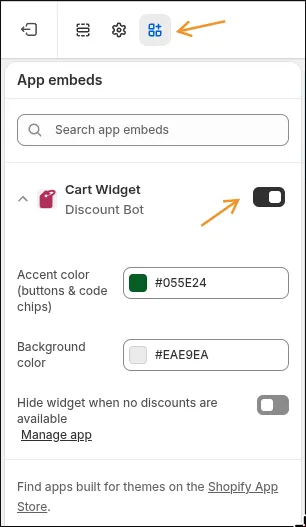
The same panel holds the widget’s style settings — set the accent and background colors to match your brand and the widget adopts them, no CSS required.
Want to see how it looks before creating any discounts? Open your storefront with ?dbot-preview added to the URL and the widget renders sample offers — without touching your real cart:
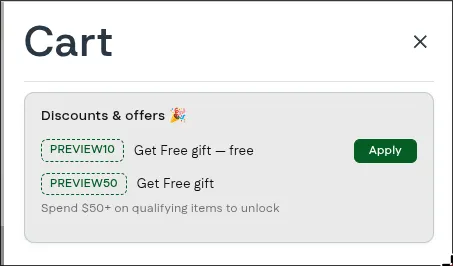
The widget is designed to work with most themes out of the box. If it doesn’t look right on yours, contact support and we’ll sort it out.
Step 3: Watch what your shoppers see
Here’s the widget in a real cart — one snowboard in it, two offers on display:
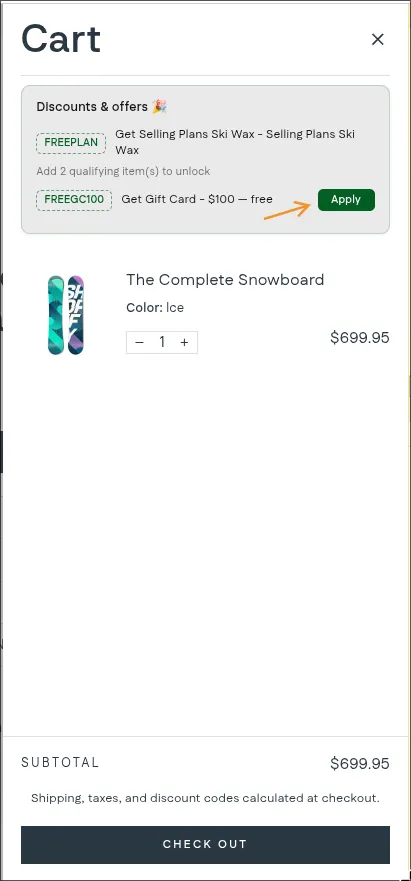
The FREEGC100 offer is unlocked: the shopper sees the code, the gift (“Get Gift Card - $100 — free”), and an Apply button. The offer above it isn’t unlocked yet, so instead of a button it says exactly what it takes: “Add 2 qualifying item(s) to unlock”.
Now the shopper clicks Apply:
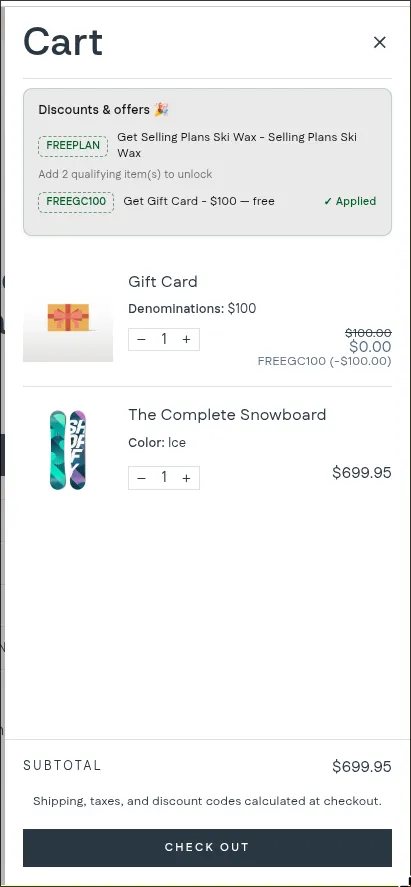
The $100 gift card is in the cart at $0.00, the code is applied, and the offer row shows ”✓ Applied”. No searching the catalog for the gift product, no typing a code.
And here’s the part I’m most proud of:
The widget never promises a deal it can’t keep.
Only confirmed offers get shown. So the price a shopper sees in the widget is exactly what they pay at checkout — no gift that vanishes on the payment page, no “but it said free” support emails.
Many gift apps guess at this instead, and when the guess is wrong, the shopper blames your store — not the app. If Discount Bot can’t confirm an offer, it shows nothing at all. A quieter cart beats a broken promise.
What about automatic Buy X Get Y discounts?
Being upfront with you:
Today, the one-click gift claim works for discount codes. Automatic Buy X Get Y discounts get a passive callout instead — when one applies, the widget confirms it so the shopper knows they got the deal:
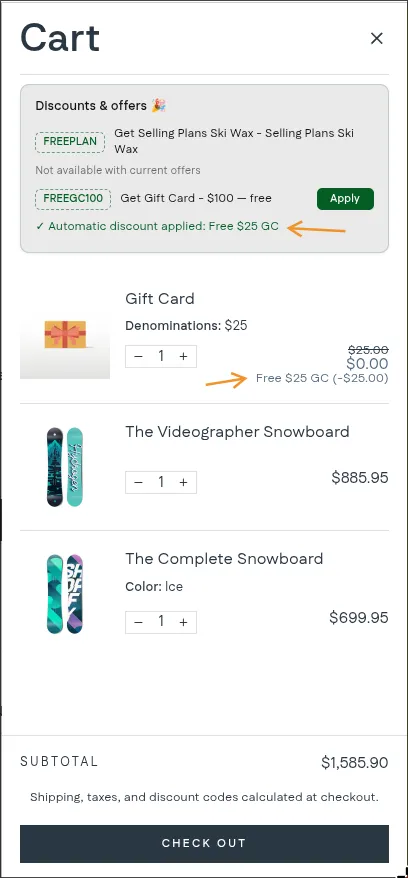
The widget doesn’t add gift items for automatic discounts yet.
One more current limit: the one-click claim works when the Get Y side is a single product. Offers whose gift side is multiple products or a whole collection don’t appear in the widget yet — the shopper would need to choose which gift they want, and we’re building a gift picker for exactly those scenarios.
Both are on the roadmap. If either is the piece you need, reach out — hearing from you moves it up the list.
Bonus #1: You decide whether sale items can be the gift
Should a product that’s already marked down be eligible as the free gift?
That’s your call, not the app’s. Every Get Y tier has its own Sale items eligibility setting — full-price items only, sale items only, or both:
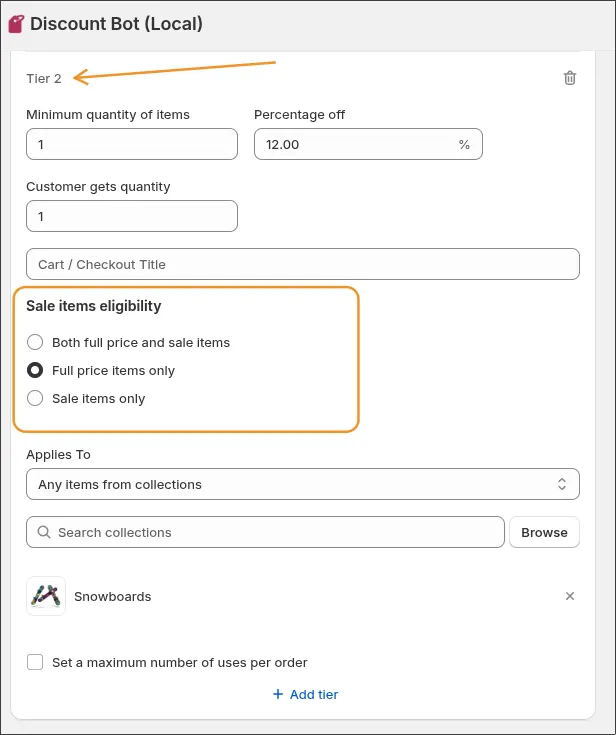
It’s the same sale-item control our merchants already use to exclude on-sale products from discounts — now applied to the gift side of Buy X Get Y.
Bonus #2: No cloned products, no performance hit
Some free-gift apps work by creating hidden $0 duplicates of your products. That road ends in inventory chaos and $0-order exploits.
Discount Bot doesn’t do that. Ever.
- The discount logic runs on Shopify Functions — native checkout speed, nothing bolted on
- The gift added to the cart is your real product, discounted by a real discount code
- The widget is a standard theme app extension — disable it or uninstall the app and your storefront is exactly as it was
It also plays well with everything else you run: your other discounts keep working, and combinable codes stack the way Shopify says they should. (Setting up storewide promotions too? See our guide on sitewide order discounts.)
Conclusion
A free gift offer only works if shoppers know it exists at the moment it matters — when they’re looking at their cart.
Set up the code once, flip on the widget, and the offer sells itself.
Install Discount Bot from the app store and try it — there’s a 7 day trial.